Boot a server from an ISO
The flagship workflow: serve an ISO over HTTP, mount it as virtual media, and boot the host from it. One tool does the whole chain.
1. Serve the ISO
Section titled “1. Serve the ISO”The iDRAC streams the image from your URL for as long as it’s mounted — the server must stay up for the entire install and support HTTP range requests:
cd /path/to/isos && python3 -m http.server 80Plain HTTP on the management LAN sidesteps the self-signed-certificate
gotcha. If you must use HTTPS with a self-signed cert, first enable
RFS.1.IgnoreCertWarning:
“Set the iDRAC attribute RFS.1.IgnoreCertWarning to Enabled on r740-lab.”
2. One-shot boot
Section titled “2. One-shot boot”“Boot r740-lab from http://192.0.2.50/rocky-9.iso”
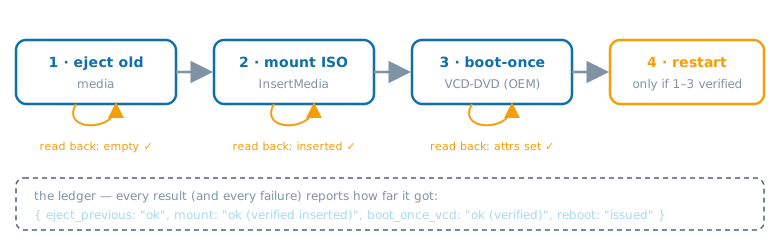
This runs idrac_boot_to_iso, which performs and verifies each step:
- Ejects any image already in the virtual CD (verified empty)
- Mounts your ISO (verified inserted)
- Sets Dell’s OEM boot-once attributes
ServerBoot.1.BootOnce+FirstBootDevice=VCD-DVD(verified by re-reading) - Restarts the host — only after step 3 verified
Why the OEM attributes instead of the standard Redfish Cd boot
override? On a box with a physical DVD drive, Cd boots whichever
optical device the BIOS enumerates first. VCD-DVD targets the
virtual CD unambiguously.
If any step fails, the error carries a ledger of what completed, so you know exactly what state the BMC is in before retrying.
3. Watch the install
Section titled “3. Watch the install”“Give me the console for r740-lab.”
idrac_console mints a one-shot HTML5 console URL (no login page) on
firmware that supports it. Open it promptly — the embedded credentials
expire in about a minute.
4. Clean up
Section titled “4. Clean up”After the installer finishes:
“Unmount the virtual media on r740-lab.”
The boot-once flag clears itself after one boot, but the ISO stays mounted until ejected — and a mounted installer plus a stray boot-order change can restart the whole install. Stop your HTTP server too.
Staging without rebooting
Section titled “Staging without rebooting”Pass reboot=false to stage everything (mount + boot-once) so the
next boot, whenever it happens, enters the installer. Useful for
maintenance windows.